

Model deployment is a critical stage in the AI lifecycle that transforms a trained model into a functional asset that is available to real users and delivers real-world value. It is the process of transforming a theoretical concept into a working model that generates real insights for the business.
Deployment comes after model training and testing. During training, the model learns from historical data. Testing evaluates its performance on data it was not exposed to during training. Finally, deployment makes the model accessible either to real users as it goes live or to systems via APIs.
Model deployment is a critical phase of the data engineering and MLOps lifecycle. During deployment, trained machine learning models are integrated into production systems to provide real-time or batch predictions at scale. It bridges the gap between experimentation and real-world operations by ensuring that models can effectively handle live data and operate within real infrastructure.
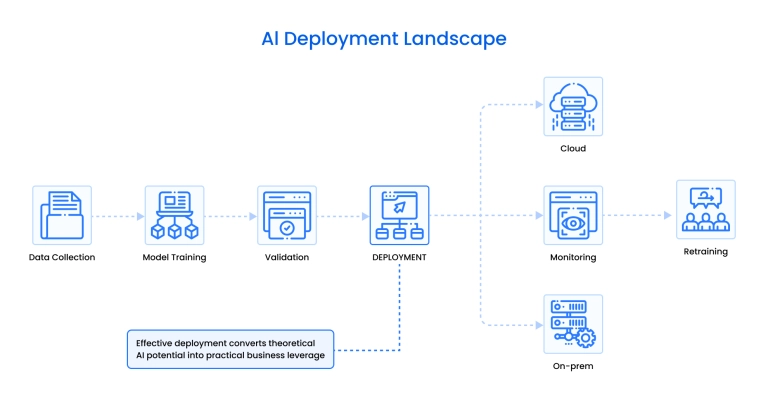
Beyond exposing a model to users or applications, deployment defines how predictions are delivered (batch, real-time, streaming, or on-device), where the model runs (cloud, on-premises, or edge), and how new model versions are introduced into production using strategies such as canary, blue-green, shadow, or A/B testing.
Deployment platforms, from managed services such as SageMaker, Vertex AI, and Azure Machine Learning to open stacks built on MLflow, Docker, and Kubernetes, provide the infrastructure that enables this operational control.
In regulated industries such as healthcare, insurance, and finance, deployment becomes a governance and compliance process as much as a technical one.
How to deploy a machine learning model? This article explores the methods, strategies, tools, and challenges associated with deploying trained models as live AI systems.
AI model deployment methods
Companies can choose between different AI model deployment methods, which refer to how and where an ML model makes predictions (inference) once it’s trained and ready for use. Depending on the selected method, the model can work in real-time, in batches, on-device, or through streams.
Here is a short overview of each standard method.
- Based on how the model processes data:
Batch inference method
The batch inference method is the one where data inputs are processed offline. It involves running the model on a large dataset at scheduled intervals. The method is called batch because datasets applied to machine learning algorithms are grouped into batches.
The method is simple to manage and resource-efficient because it does not need a robust data infrastructure. Therefore, it is a popular choice for backend analytics workflows. The batch interference method is used when the processing of data does not have to be synchronous. This includes financial transactions, document analysis in healthcare and insurance, and image classification.
Real-time inference method
The real-time inference method deploys the model as a live API or service that can respond instantly to incoming data. This method offers a more engaging user experience. The input type in a real-time interference method is individual requests on demand that are added in real time.
Unlike the batch method, it requires robust infrastructure and low-latency processing, making it much more expensive. It is used in all the applications when real-time life processing is needed, mainly for personalized user experiences. Some examples include chatbots and recommendation engines. Instant recommendations on TikTok and YouTube Shorts use this method.
Streaming inference method
The streaming inference method processes continuous data streams in real-time, making predictions on each event as it arrives. Unlike traditional real-time inference, which handles single requests, streaming methods are optimized for high-throughput environments, such as financial trading systems or live video analytics.
This AI model deployment method is suitable for time-sensitive applications, such as traffic management, fraud detection, or industrial automation. Big social media platforms use this method for content moderation.
Edge deployment method
The edge deployment method pushes the model directly to edge devices (smartphones, IoT sensors, etc.). This AI model deployment method is commonly used in autonomous vehicles and smartphones. It is used across all edge AI applications, including those that monitor cardiovascular health and diabetes.
- Based on deployment:
On-premises deployment method
The on-premises deployment method runs the model on local servers rather than in the cloud. It is used by companies in industries with strict data security requirements , where security is more important than speed or method of deployment, as it provides complete control over infrastructure and data handling.
Cloud deployment method
The cloud deployment method hosts the model on cloud platforms like AWS, Azure, or Google Cloud. It offers scalability, flexibility, and easy integration with other services. This method is widely adopted due to its cost-effectiveness and the availability of managed services, such as model monitoring and auto-scaling.
- Miscellaneous:
Multi-model deployment method
The multi-model deployment method enables the hosting of multiple models within a single environment or endpoint, when a single model does not cover all the needs. This method is useful for A/B testing, model comparison, or applications that require multiple models for various tasks, such as e-commerce platforms and banking apps.
Partner with AI experts who understand regulated industries
How model deployment works
AI model deployment involves several stages with unique tasks for each: planning, environmental setup, model training and evaluation, model packaging, actual deployment, integration, testing and validation, monitoring, and establishing CI/CD pipelines.
1. Planning
Before deploying any machine learning model, you need a clear deployment plan that aligns with all goals.
At this stage, the team:
- Defines the deployment objective
- Identifies stakeholders and responsibilities
- Chooses the AI deployment strategy for IT (canary, blue-green, shadow, etc., based on risk tolerance and rollout needs)
- Evaluates infrastructure requirements : for example, you decide between cloud and on-prem
- Assesses compliance depending on the industry
- Documents success metrics (e.g., what is a successful model deployment) and rollback criteria (what is not)
- Creates a deployment timeline and checklist
2. Environment setup
You need to create a suitable environment for running the model.
This includes:
- Provisioning compute resources (cloud, on-prem, or edge)
- Figuring out the right environment settings for the model
- Establishing security measures (access control, authentication, encryption).
- Selecting the runtime (Python, TensorFlow Serving, etc.)
- Setting up necessary infrastructure, including databases, storage, and libraries.
- Establishing backup and disaster recovery strategies
3. Model training & evaluation
This phase transforms prepared data into a deployable model through training and optimization. At this point, you:
- Select the right algorithm based on the problem type
- Classification: Logistic Regression, Decision Trees, Random Forest, Neural Networks
- Regression: Linear Regression, XGBoost, Neural Networks
- Train the model
- Track training progress
- Evaluate performance:
- Choose task-appropriate metrics:
- Classification: Accuracy, Precision, Recall, F1, ROC-AUC
- Regression: RMSE, MAE, R²
- Validate using k-fold cross-validation or bootstrapping.
- Conduct fairness and bias audits where required.
- Stress-test scalability and latency using realistic, production-like hardware.
- Determine deployment readiness based on predefined criteria.
4. Model packaging
Before deployment, the model must be packaged along with its dependencies, such as pre-processing scripts, libraries, and configurations. This is often done using containers (e.g., Docker) to ensure consistency across environments (in AI/ML development , testing, and production).
5. Model deployment
The packaged model is deployed to a production environment. The team does a final infrastructure preparation to make this happen.
This could involve:
- Hosting it as a REST/gRPC API
- Deploying to a batch job scheduler
- Mounting it as a container in Kubernetes
- Using MLOps platforms like SageMaker, Vertex AI, or MLflow
- You also configure autoscaling, hardware acceleration (GPU/TPU), and deployment policies (e.g., canary rollout).
6. Model integration
The packaged model is then integrated into an application or system. This might involve exposing it via a REST API, embedding it into an existing app, or linking it to a data pipeline. This stage ensures the model can receive inputs and return outputs in real-time or batch mode.
7. Testing and validation
Before going live, the deployed model has to be tested in staging environments. This includes functional testing (does it work?), performance testing (how fast is it?), and safety checks (how does it behave with edge cases?).
In testing, the model must align with the performance metrics set during the planning stage. The model is also expected to merge well with the production environment and other systems used in the organization. The system's ability to operate under heavy workloads can also be tested. Everything performed at this stage of AI model deployment must be documented with outcomes.
8. Monitoring and logging
Once deployed, the model is continuously monitored to track its performance, latency, usage, and potential data drift. In the context of AI and ML model deployment, data drift refers to a change in the input data patterns over time, compared to those on which the model was trained. Once this happens, the model can no longer make accurate predictions and has to be re-evaluated. Models have to be periodically retrained if new data becomes relevant or business conditions change.
Logging tools are used during the monitoring and logging stage to capture inputs, outputs, and errors for troubleshooting and auditing purposes. Having feedback from users is crucial to making the changes.
9. Continuous integration and continuous deployment (CI/CD)
Deployed models need updates due to changes in data and performance degradation. Teams implement CI/CD pipelines for model versioning and support rollback mechanisms in case a new version fails. CI/CD pipelines can automate the process of deploying ML models.
AI model deployment strategies
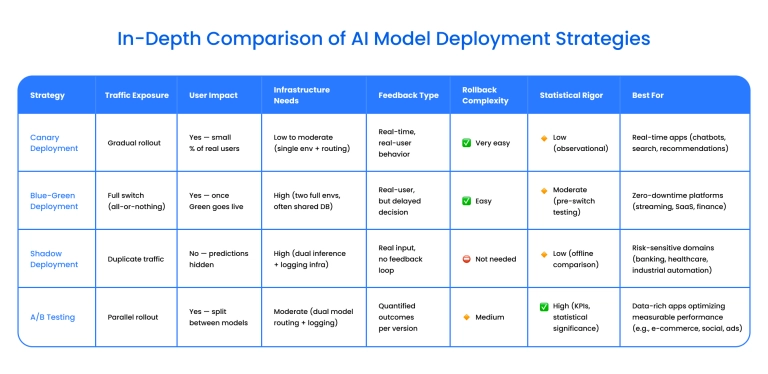
An AI model deployment strategy is one of the most critical components of the whole deployment process. It defines how a new or updated model is introduced into production (e.g., how you roll out the model). The most common strategies are canary deployment, blue-green deployment, shadow deployment, and A/B testing.

Canary deployment
In this strategy, a new model version is rolled out to a small subset of real users first, while the rest of the users still use the original live model. When it reaches the point of performing well without bugs, it replaces the old version entirely.
Canary deployment is a minimal-risk AI deployment strategy that enables testing bugs in real-time on actual users. If a problem arises, the new version is rolled out and then rolled back until all bugs are fixed, and it is ready for all users.
This is a minimal-risk strategy that allows real-time feedback. It requires no downtime and is relatively inexpensive; however, it requires a mechanism for monitoring testing data on real users.
Best for:
- Applications that perform real-time evaluation of data in the real world (recommendation engines, search engines).
- Applications when testing needs to be fast (chatbots and virtual assistants)
Blue-green deployment
In this model, two identical environments (blue and green) are run side-by-side. These are two separate, identical environments that can, however, share some database components because setting them up separately is expensive.
The Blue environment runs the current live model, while the Green environment hosts the new version. The new model is tested in the Green environment using real data. When it is confirmed to work correctly, traffic is switched from Blue to Green, making the new model live. Once the Green environment is live, Blue continues to serve as a backup in case something goes wrong.
This strategy ensures zero downtime with rollbacks just as easy as canary deployment, but it requires duplicate infrastructure that is expensive and challenging to implement.
Best for:
- Applications that allow for zero downtime, such as web-based SaaS platforms (e.g., GitHub) or streaming platforms. For blue-green deployment of adjacent applications, zero downtime and entire environment validation matter more than individual user-level rollouts.
Shadow deployment
In the shadow deployment model, the new shadow model operates in parallel with the live system. It receives real production data, but its predictions are not used to affect real outcomes. It receives the same inputs, and its outputs are logged for evaluation. However, it is never shown to real users. The shadow model is different from the original one.
The request is sent to both the live and shadow models through separate API endpoints. Both models make predictions, but only the live model's output is returned to users.
The shadow model’s predictions are logged and later compared to the ground truth. This helps data scientists evaluate its performance without affecting users, and decide if it's ready for full deployment. With shadow deployment, you can efficiently assess different aspects of the new model's performance.
Some disadvantages of this model are that it can be expensive and that it does not incorporate live input from real users.
Best for:
- High-risk and heavily regulated applications like credit scoring in banking, when you need to test a new model on real customer data, but do not want to expose users to a test model.
A/B testing AI deployment strategy
This strategy is data-based. It works by randomly assigning a portion of users to receive predictions from either Model A (baseline) or Model B (candidate). Both models go live simultaneously, each for 50% of users. Their behaviors or outcomes are then tracked and compared, and the data scientists then choose the best design based on the data received from users.
The strategy is used explicitly by e-commerce and social media platforms because they have easily measurable KPIs and massive customer bases, which makes the data that is received as a result of A/B testing significant.
A/B testing quantifies performance improvements by measuring actual impact (e.g., click-through rate, conversions). This deployment for AI strategy requires user segmentation and routing logic, as well as clear metrics and statistical significance thresholds.
However, it is still comparatively simple and offers quick results. The more complex the test, the less reliable the model. Therefore, it works best for simple tests when only one or two factors change between the models, such as modifying a discount model.
Best for:
- Optimizing customer-facing models (e.g., pricing, recommendations) in e-commerce platforms like Shopify.
- Controlled experimentation in web/app environments.
Strategies comparison
Selecting deployment strategy for regulated industries
In regulated sectors such as healthcare, insurance, and finance, compliance is the top factor in AI and ML deployment strategies. Regardless of other factors involved in the project, you need to audit and be able to rollback at any moment.
We recommend combining shadow deployment (for silent validation) with a controlled canary rollout (for phased go-live). For example, this strategy would be used for disease detection using machine learning .
At Binariks, we help clients set up these strategies from planning to maintaining CI/CD pipelines. We select methods and tools based on unique organizational objectives and tangible KPIs, and create control systems around these models.
With a proven track record of experience in regulated industries, we are skilled at navigating the nuisance of compliance.
Platforms and tools for model deployment
Platforms and tools serve as the technical backbone that enables a trained model to transition from a development environment to real-world usage. Below is the overview of the most popular ones.
- Amazon SageMaker
This is a simple, fully managed end-to-end service for model training and deployment by Amazon. Features include built-in model monitoring, drift detection, auto-scaling, A/B testing, and endpoint management. The tool integrates with other AWS services.
Best suited for: Teams already on AWS seeking an all-in-one, low-maintenance deployment solution.
- Google Vertex AI
The Google tool supports end-to-end ML workflows, including training, tuning, and deployment. It offers easy integration with GCP infrastructure and powerful experiment tracking. Machine learning deployment is versatile, with everything from custom models to low-code.
Best for: Data-centric organizations already using Google Cloud that are interested in experimentation, autoML, and managed services. You can test different models (such as logistic regression vs. neural networks) and tune settings (like learning rate or tree depth) to see which performs best, for example, when predicting which customers are likely to cancel their subscription.
- Azure Machine Learning
A Microsoft tool for ML deployment with enterprise-grade MLOps that supports many governance features. Has superior built-in security and compliance.
Best suited for: Regulated industries (such as finance and healthcare ) or enterprises heavily invested in Microsoft Azure.
- TensorFlow Serving
A flexible, open-source serving system designed explicitly for TensorFlow models.
Best for: Engineering teams with TensorFlow expertise who need complete control over custom deployment setups. Also great for those looking to deploy ML models as small services (often microservices) that can handle multiple requests simultaneously and scale to serve more users as needed.
- MLflow
An open-source platform that includes model tracking, packaging, and deployment. Works across many frameworks and supports multi-cloud environments.
Best for: Teams using multiple ML frameworks (e.g., scikit-learn, PyTorch, TensorFlow) who want open tracking and deployment without committing to just one framework.
- Docker + Kubernetes
This combination of ML model deployment tools is commonly used for containerized model deployment, where your model and all its dependencies are packaged into containers (via Docker) and then orchestrated at scale (via Kubernetes).
Best suited for: Teams with strong DevOps skills who require maximum flexibility and control over their deployment architecture.
What to look for in this platform
When evaluating the deployment of machine learning models, consider the following factors. Each factor comes with models that are the best option for it. Pick the model that fits multiple essential factors for your project:
1. Scalability
Can the platform scale up or down based on usage patterns? Is auto-scaling available?
Use:
- Amazon SageMaker – Built-in auto-scaling for endpoints.
- Google Vertex AI – Auto-scaling for online prediction services.
- Kubernetes – Gives complete control over horizontal and vertical scaling. Use with caution if your team lacks experience in DevOps.
2. Latency and Performance
Does it meet your application’s speed and throughput requirements?
Use:
- TensorFlow Serving – Optimized for low-latency inference.
- Docker + Kubernetes – Highly customizable for tuning latency. Use if your team is capable of tuning and monitoring resource usage.
- Vertex AI or SageMaker – Good performance for managed APIs with tuning options.
3. Monitoring and Logging
Are there built-in tools for tracking model performance and drift?
Some platforms integrate alerts for flagging anomalies.
Use:
- Amazon SageMaker – SageMaker Model Monitor for drift, logs, metrics.
- Azure Machine Learning – Built-in monitoring and alerts.
- Google Vertex AI – Observability through Cloud Monitoring + Explainable AI.
- MLflow – Good for logging experiments and metrics in open-source stacks, but not for production-grade monitoring, unless you have extra tools.
Additional platforms to consider for alerting are Arize AI, Fiddler AI, and WhyLabs.
4. Version Control
Does the platform support easy rollback, A/B testing, and comparison of model versions?
Use:
- MLflow – Native model versioning and experiment comparison.
- Vertex AI – Supports versioned models, A/B testing via endpoints.
- SageMaker – Supports model versioning, staging, and rollback workflows.
5. Security and Compliance
Especially important for healthcare, finance, and other regulated sectors. Look for features like audit trails, access controls, and support for encryption.
Use:
- Azure Machine Learning – Strong governance, role-based access, compliance options.
- SageMaker – AWS-native identity management, audit logs, encryption.
- Vertex AI – GCP’s IAM, VPC integration, and audit trail support.
Avoid DIY stacks (such as raw Kubernetes) unless your team has established strict DevSecOps practices in place.
6. Integration
Can the platform easily integrate with your existing data pipelines, APIs, or applications?
Use:
- MLflow – Very flexible, integrates easily with most ML tools and APIs.
- Docker + Kubernetes – Fully customizable, works for complex pipelines.
Vendor-managed platforms, such as SageMaker or Vertex AI, may not integrate easily with on-premises tools or custom legacy systems unless planned carefully.
7. Serving Capabilities
Can the platform support your model’s delivery mode: real-time, batch, multi-model, or hardware-accelerated inference?
What to evaluate:
- REST/gRPC support for real-time APIs
- Batch job scheduling
- Multi-model endpoints or ensemble routing
- GPU/TPU inference support
- Async queueing support
Use:
- TensorFlow Serving – Optimized for real-time inference over gRPC/REST; good for low-latency deployments.
- SageMaker – Supports batch transform, asynchronous inference, and multi-model endpoints.
- Vertex AI – Real-time serving, batch predictions, and model ensembles via endpoints.
- KServe (on Kubernetes) – For advanced setups like ensemble routing or GPU sharing.
- Docker + Kubernetes – Flexible, but requires manual setup for batch vs real-time queues.
8. Ease of Use
Is the platform user-friendly enough for teams without deep MLOps or DevOps expertise?
What to evaluate:
- UI/UX quality
- Low-code or drag-and-drop workflows
- Dev-to-deploy workflow integration
- Community support and documentation
Use:
- Vertex AI – Excellent UI and AutoML options; great for experimentation and iteration.
- Azure ML Studio – Drag-and-drop workflows and guided deployment options.
- Amazon SageMaker Studio – Visual IDE, low-code components like JumpStart and Pipelines.
- Avoid using Docker and Kubernetes without wrappers due to the high learning curve.
9. Deployment Flexibility
Can the platform deploy an AI model across multiple environments, including cloud, on-premises, edge, or hybrid?
What to evaluate:
- Edge support (IoT devices, mobile)
- Multi-cloud or hybrid compatibility
- On-prem and VPC deployment
- Serverless vs Kubernetes-based support
- Rollback and staging workflows
This is relevant for regulated industries and enterprise-level teams.
Use:
- Docker + Kubernetes – Most flexible; works across cloud, edge, and on-prem with the right setup.
- MLflow – Can be used across environments and clouds if paired with a serving solution.
- SageMaker – Strong cloud-native deployment, supports private VPCs; limited edge support.
- Vertex AI – Great for cloud and hybrid GCP environments; edge deployment via Coral/TPU edge.
- Azure Machine Learning – Supports on-prem, edge (IoT Hub), and cloud. Great for regulated industries.
10. Cost and Vendor Lock-in
Consider the long-term operational cost and how tightly the platform locks you into a specific cloud provider or ecosystem.
Use:
- MLflow + Docker/Kubernetes – Best for avoiding vendor lock-in; can run anywhere.
- Vertex AI / SageMaker / Azure ML – Easier to use but ties you to their ecosystem.
- Hybrid approach – Use open-source tools on cloud infrastructure if neither option is the best fit for you.
Core model deployment challenges
When deploying machine learning models, companies face challenges with data, infrastructure, scalability, model performance, collecting feedback, and navigating collaboration between various stakeholders.
Bias and context awareness
Data and algorithms in AI model deployment may present bias, meaning they will not accurately represent the population or be unfair to certain groups. Data also have to demonstrate context awareness that adheres to specific domain knowledge.
For example, financial models must comply with strict regulatory standards, such as FCRA (Fair Credit Reporting Act). Models must also be adaptable to changes in the environment to demonstrate context awareness. Diverse datasets and fairness algorithms in AI deployment strategy help prevent bias.
Infrastructure complexity
When deploying models, you orchestrate across multiple components, including cloud resources, APIs, data pipelines, and security layers. If the proper infrastructure is not in place, machine learning model deployment is at risk, as the model would have to be retrained with fresh data.
The components of a robust infrastructure include containerization tools like Docker and orchestration platforms like Kubernetes, which enable reproducible environments, as well as Infrastructure-as-Code (IaC) practices and MLOps platforms.
Scaling AI systems
Scaling AI models is a complex process because it requires adding capacity without compromising performance. Autoscaling and load balancing solutions are what are most often applied by organizations to counter this issue.
Model performance in production
A model that performs well during testing might behave unpredictably in production. Things that can happen include data drift and changing user behavior. For this reason, model deployment in machine learning requires constant monitoring.
Lack of monitoring and feedback loops
Many teams deploy machine learning models without setting up systems to track accuracy, latency, or usage metrics. This is clearly a mistake, as the model must be monitored after deployment to ensure that the results are accurate and the performance is optimal. End-to-end observability is the solution in this case.
Cross-team collaboration gaps
Successful deployment requires coordination among data scientists, DevOps engineers, product managers, and compliance officers, whose skills and experience often differ and may not overlap.
Misalignment in goals and priorities will present with delays and poor integration. Companies should adopt cross-functional workflows using shared tools and documentation. Everyone needs to be aligned regarding KPIs.
Integration with existing systems
Machine learning models can be incompatible with an organization's legacy systems. Middleware solutions help mitigate this risk; however, it is also essential to manage data flow between different legacy systems using ETL (Extract, Transform, Load) and ELT (Extract, Load, Transform) pipelines.
For a successful integration with existing systems, the deployment should be paced and not rushed.
Conclusion
AI model deployment operationalizes machine learning by delivering production predictions through batch, real-time, streaming, or edge inference.
The right deployment approach combines a rollout strategy – canary, blue-green, shadow, or A/B testing – and a platform – for example, Amazon SageMaker, Google Vertex AI, Azure Machine Learning, or an open stack using MLflow, Docker, and Kubernetes. Because models change over time, successful machine learning model deployment depends on monitoring, logging, drift detection, versioning, and reliable rollback mechanisms.
In regulated industries like healthcare, insurance, and finance, governance and compliance add extra requirements: audit trails, strict access control, documented decision logic, and human review for high-impact cases. However, when done right, AI model deployment turns ML from a one-off experiment into a measurable, repeatable business capability.
Ready to move from prototype to production? Contact Binariks to deploy, monitor, and govern ML models with confidence.
Author

Share

